G3 Telecom portal
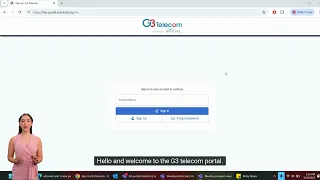
This lesson introduces the G3 Telecom partner portal. You will learn how to locate customer records by account ID, phone number, or email, review account and plan details, submit orders accurately, and follow best practices for secure access including SSO and MFA.
Hello and welcome to the G3 Telecom portal. If this is your first time accessing the portal, please click on Sign Up to create an account. You will be required to enter your first and last name, an email address, and a password of your choice. Then, you will need to provide a physical address including your postal code, city, and province. Once everything is completed, click on Sign Up to proceed. If you already have an account, simply enter your email address, click on Sign In, enter your password, click Sign In again, and you will access the portal. The main view, or dashboard, shows your available minutes, the number of days remaining on your active plan, the total number of calls for the month, and your top calling destination. Under the Account section, please fill in your details by clicking Edit if you haven’t done so already. You’ll need to enter your first name, last name, and address, and you also have the option to enable two-factor authentication. Don’t forget to click Save Changes. Under Payment, you can add a new credit card or delete an old one if it is no longer active. You will be required to enter the cardholder’s name, card number, expiration date, and CVC. Click Save once you’ve entered all the details. Under Package and Auto Recharge, you’ll be able to see your current package. Under CDR, you can view the calls you’ve made, while the Receipts section allows you to see all processed payments. You can also download invoices or resend them to your email. To call a destination outside of your calling plan, you can add funds to your account. Simply click Add Funds, enter the amount, and select a previously added card or a new one if you prefer, then process the payment. To purchase a plan, go to the Packages section and choose one that suits your calling needs—for example, the Unlimited North America Plan. Once selected, choose your payment method and click Pay Now. The plan will then be added to your account. You will see your available minutes and the number of days remaining on your plan. To place calls from a specific phone number, don’t forget to add that number to your account. Once added, you will see confirmation that it was successfully saved. If you want to place calls from a different number, you’ll need to use your Account PIN at the start of the call. Finally, to sign out of the portal, simply click on Sign Out, and you’ll be returned to the sign-in page.
Up next
2:39